Open source video clipper

Wide video in. Vertical clips out.

Finds the moments worth posting, crops to whoever is speaking, and burns in the captions. On your machine, not a server.

Download for macOS, Windows or Linux

MIT licensed. No subscription. Roughly $0.36 per hour of video.

Tracking

NOBODY TELLS YOU…

The crop follows the voice, not the movement

Two ways to work

Cut the highlights, or caption the lot

Both run on the same project and share the transcript, so moving between them never pays for transcription twice.

Mode one

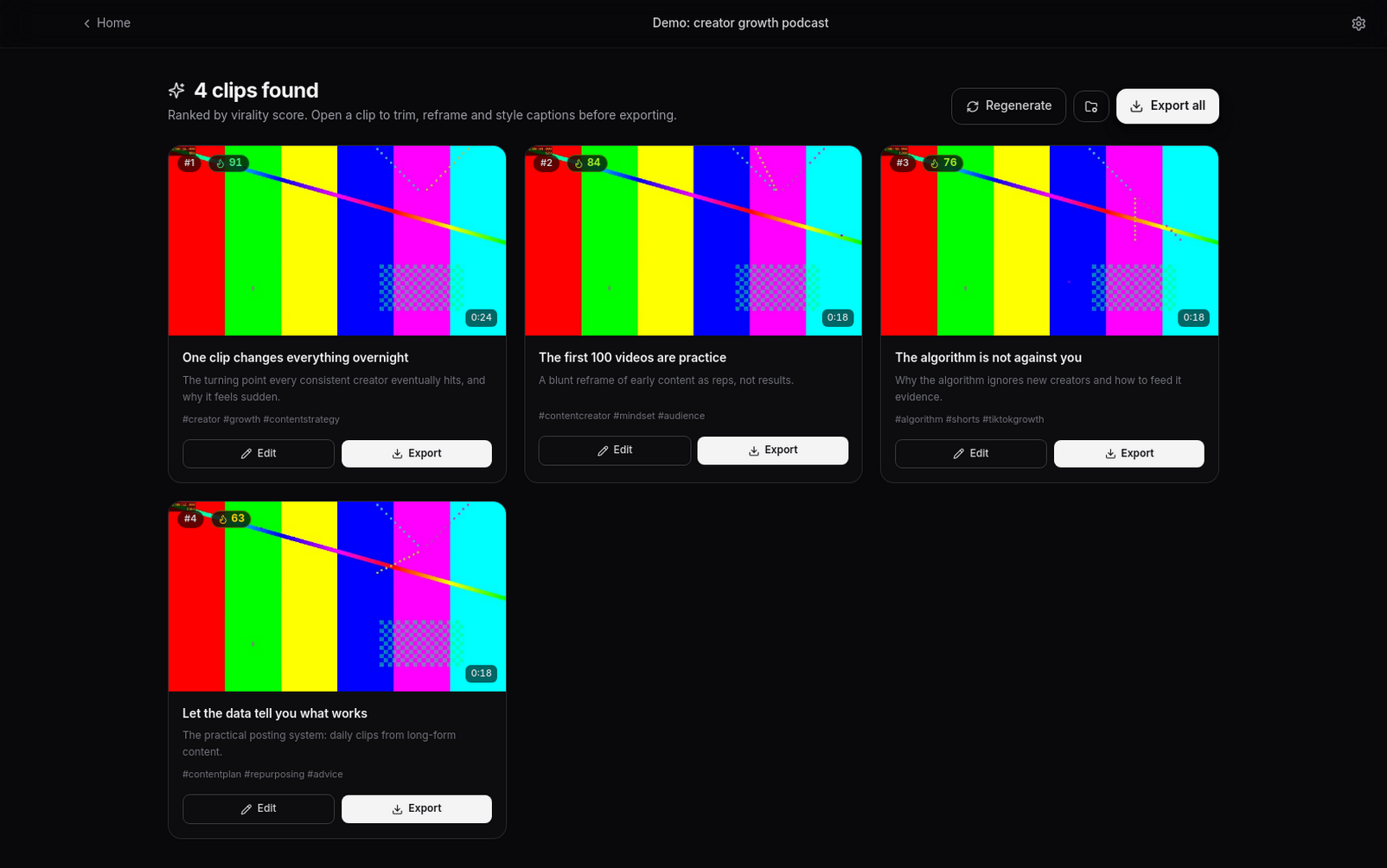
Find the clips worth posting

The AI reads the transcript and cuts out self-contained moments, each with a hook, a build and a payoff, then scores them. A second pass checks every ending and extends it to the beat that finishes the thought.

  • Scored 0 to 99, with the reasoning shown
  • Steer it with your own brief, such as "find the funniest exchanges"
  • Pauses and filler words removed on request
ClipForge listing AI-found clips, each with a virality score and the reasoning behind it

Mode two

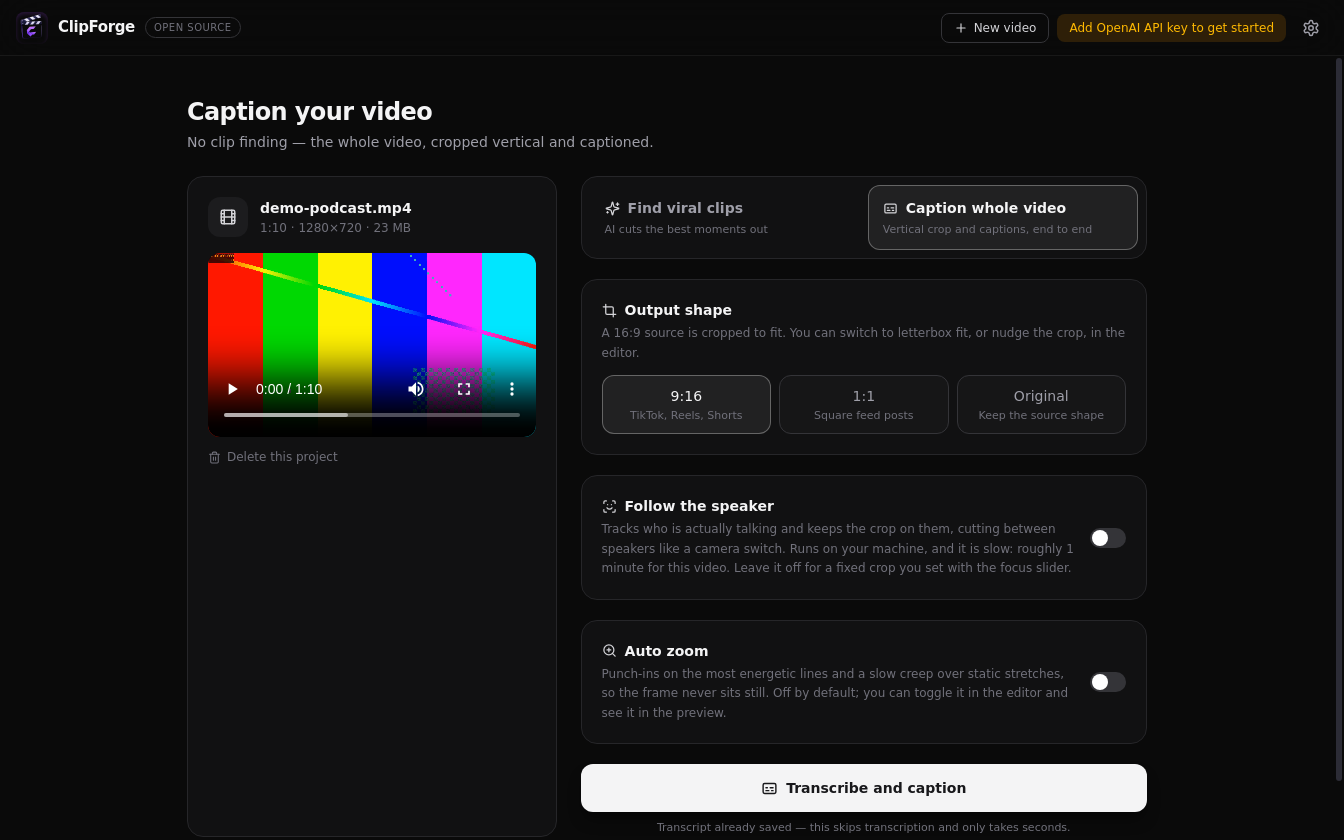
Caption the whole video

No clip finding. Hand it a 16:9 video and it comes back as one vertical, captioned edit, ready to trim and restyle. Useful when you already know the video is the thing you want to post.

  • Optional speaker tracking across the full runtime
  • Scene-aware auto zoom, or a fixed crop you set yourself
  • Letterbox instead of crop, for screencasts and slides
The ClipForge setup screen, choosing between finding viral clips and captioning the whole video, with output shape, speaker tracking and auto zoom options

$0.36

Per hour of video, paid to OpenAI directly, for transcription and analysis. That is the whole cost. There is no plan, no cap and no account.

Under the bonnet

Built like an editor, not a wrapper

The preview is the export

Caption layout, tighten-cuts and zoom planning all live in one place, used by both the live preview and the renderer. What you see playing back is what lands in the file, which is a constraint that has caught more bugs than any test.
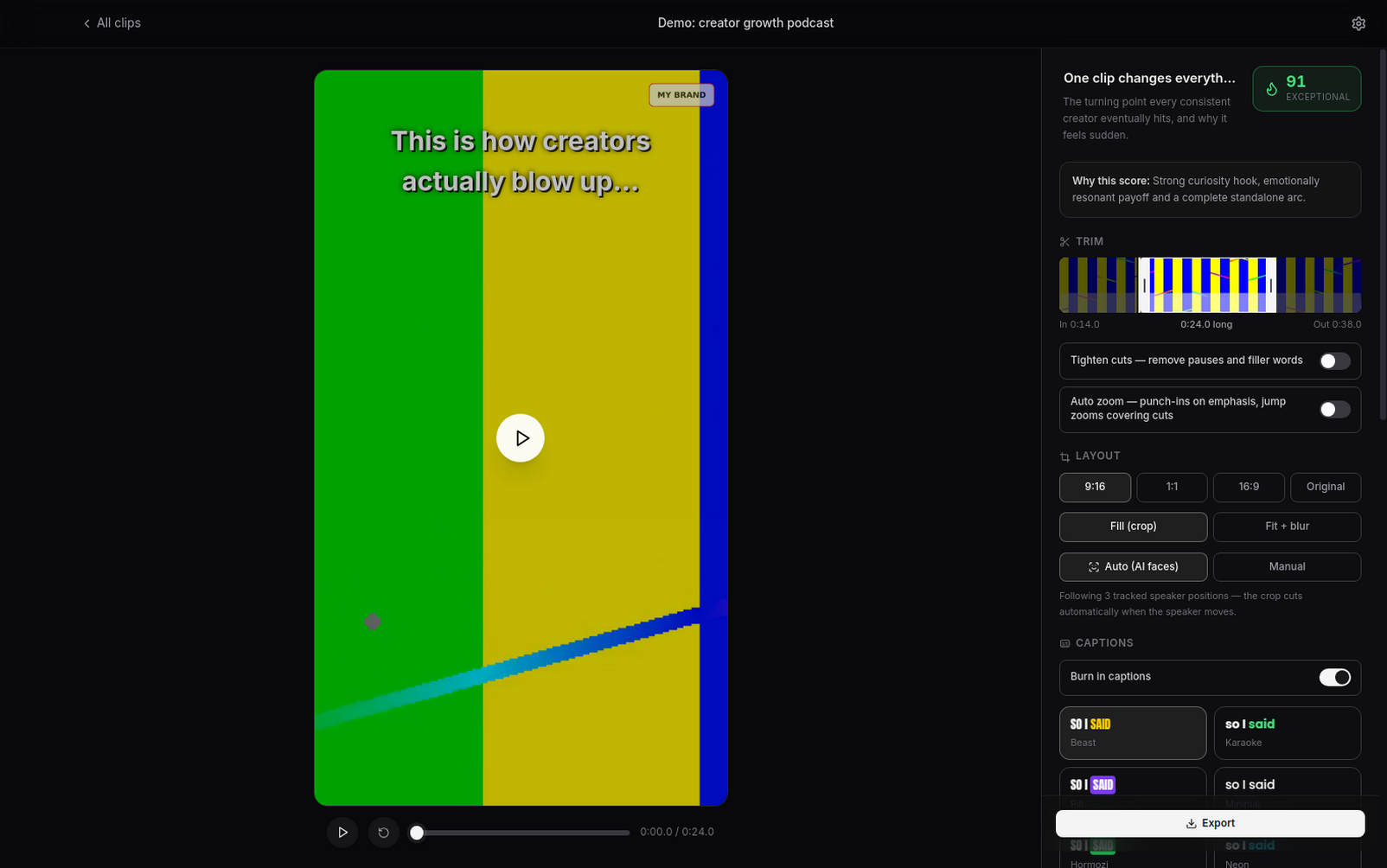
The ClipForge editor showing a live 9:16 preview beside trim, layout and caption controls

Speaker detection, on-device

Every face's lip movement is checked against the actual soundtrack, so the crop holds on the person talking rather than the person gesturing. Runs locally through ONNX Runtime.

Scoring with a basis

A rubric drawn from Berger and Milkman's work on what gets shared, plus measured vocal energy and a vision pass over sampled frames.

12

Caption styles, plus your fonts

Karaoke word highlighting burned in with libass. Drop in any TTF or OTF and the preview matches.

Imports almost anything

Local files, or a link from YouTube, Vimeo, TikTok and anywhere else yt-dlp reaches. Private and SSO-protected videos work by borrowing your browser's login.

The pipeline

What happens after you hit go

01

Import

A local file, or a URL. Long recordings are fine; nothing is capped.

02

Transcribe

Whisper, with word-level timestamps. Audio is chunked and the result is checkpointed to disk as it arrives, so a failure part way through never means paying twice.

03

Find or caption

Either the AI picks and scores the moments, or the whole video becomes one edit.

04
No network

Track and reframe

Face tracking and active speaker detection build a focus track, and the crop cuts between speakers like a camera switch. Entirely on your hardware.

05
No network

Edit and export

Trim on a filmstrip with a waveform, restyle the captions, add your watermark, then render to H.264 with the audio normalised to −14 LUFS. GPU when you have one, CPU when you do not.

The boundary

What leaves your computer

Worth being precise about, because "local-first" gets used loosely. Two things need a hosted model. Everything else runs on your hardware.

Never leaves

  • The video file itself
  • Rendering and export
  • Face tracking and speaker detection
  • Zoom planning and scene cuts
  • Caption layout and burn-in
  • Every edit you make

Your API key is stored encrypted through the OS keychain, using Electron safeStorage.

Sent to the OpenAI API

  • Extracted audio, to transcribe
  • The transcript text, to analyse
  • A few sampled frames, to score visually

Running Whisper locally, so even this stays on your machine, is the most requested open issue.

The trade

Against the subscription tools

The hosted tools are good at this. They also charge monthly, cap your minutes, and want your footage on their infrastructure.

ClipForge compared with Opus Clip and similar subscription tools.
  ClipForge Hosted alternatives
Price Free and open source. You pay the API directly, in cents Monthly subscription
Your footage Stays on your machine Uploaded to their cloud
Processing time Unlimited. It is your hardware Capped per plan
Watermark Your own logo, or none at all Removed on paid tiers
Models Your choice, and configurable Theirs
Changing it Fork it, script it, send a pull request Closed

Before you download

Questions

Is it actually free?

The app is free and MIT licensed, permanently. You pay OpenAI directly for transcription and analysis, which works out at roughly $0.36 per hour of video. There is no subscription, no account, no processing cap and no paid tier holding features back.

Do I need an OpenAI API key?

For finding clips and captioning, yes, because that is what does the transcription and the analysis. Everything else runs without one: the editor, trimming, caption styling, auto zoom, speaker reframing, watermarks and export.

Running Whisper locally so transcription costs nothing is the most requested open issue, and contributions are welcome.

Does my video get uploaded anywhere?

No. Only extracted audio, the transcript and a handful of sampled frames go to the OpenAI API. The full video never leaves your machine.

Do I need a GPU?

No. ClipForge uses NVIDIA NVENC if it finds it and falls back to CPU encoding automatically. A GPU makes exports faster, nothing more. Speaker detection runs on CPU perfectly well.

How long can my video be?

There is no fixed limit. Audio is chunked and transcription is checkpointed to disk as it goes, so hour-plus recordings work, and a failure part way through does not mean paying to transcribe it again.

Does it work in languages other than English?

Transcription does. Set the language in Settings; it defaults to English because auto-detect occasionally mislabels English as a similar-sounding language. Captions burn in whatever Whisper returns. Translating captions into another language is on the roadmap, not built yet.

Can it post to TikTok or YouTube for me?

Not automatically. It writes the post caption and hands you the file, then you upload. Direct publishing needs an audited TikTok or YouTube app, which is on the roadmap.

Can I use the clips commercially?

Yes. MIT licence, and the output is yours. Do check the rights on any source footage you did not create.

macOS says the app cannot be opened. Why?

The macOS builds are not code-signed yet, so Gatekeeper objects on first launch. Right-click the app and choose Open, which is a one-time step. Signing and notarisation are wanted, and help is welcome.

Why does the source video look like a test pattern?

Because it is one. The screenshots come from a demo project that generates its own video with ffmpeg, so the test suite needs no downloads and no API calls. Real demo footage is wanted, and there is an open issue for anyone happy to contribute a clip.

Clip your own footage tonight

Free, open source, and it runs on the machine you are reading this on.

Download ClipForge